Dashboard
A self-contained mission-control page, regenerated from your home, that shows the platform, the agent, and its modules on one screen.
Every sync regenerates <HOME>/dashboard.html. Open it like any file: no server, no service, no account. A left sidebar carries the plugin's wordmark and version, the page nav, your operator card, and a system-health badge. The pages are operator-first: what needs you today comes before how the machinery works.
Try it
A live demo, rendered from a fictitious company's home (Acme's agent Ace, operator Alex Chen), is at agentlayer.one/demo/dashboard. Every screenshot in this section comes from it.
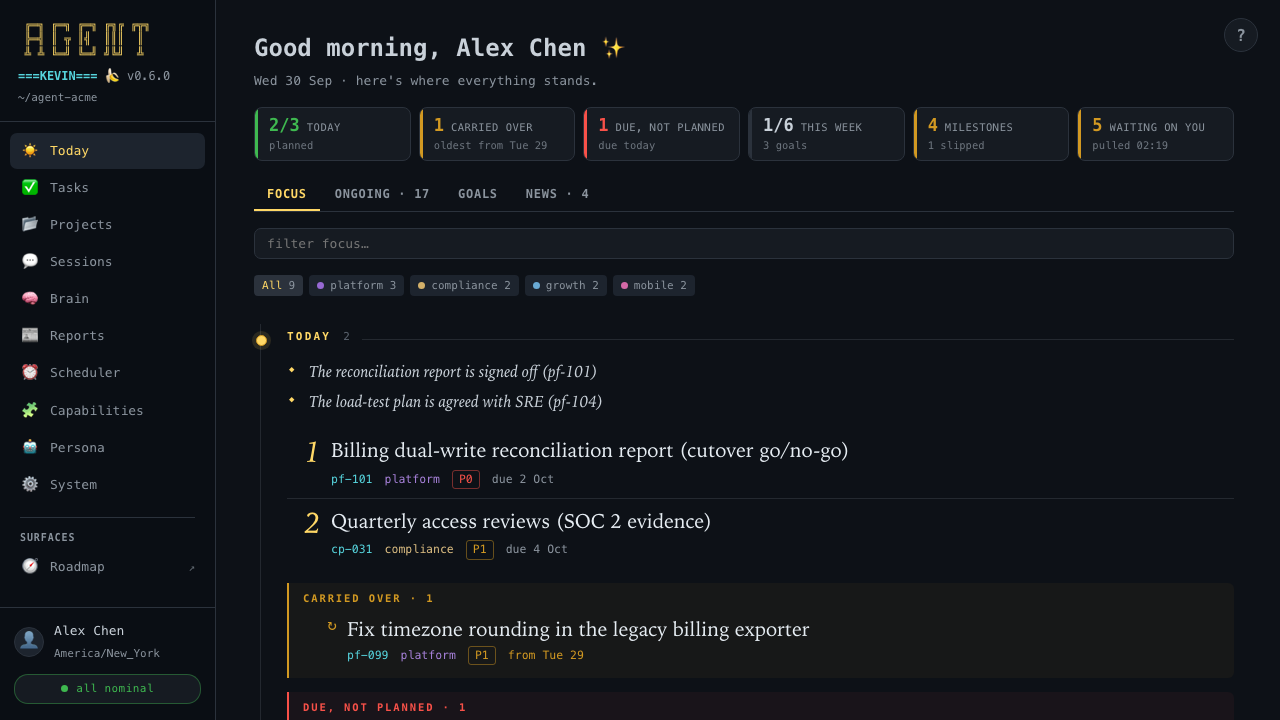
The pages
| Page | What it's for |
|---|---|
| Today | Your day, opened on Attention: today's three, what slipped, the week and month, the roadmap, who is waiting on you, what moved today, goals, and the morning's news |
| Tasks and projects | Every open task by deadline, what's in flight, blocked, or going stale, and each project's progress |
| Sessions | What you and the agent worked on, where it left off, and how to resume it |
| Brain | What the agent loads every session and what it has learned |
| Reports and scheduler | Everything the agent produced, and the routines that keep it current |
| Capabilities | Every skill, tool, command, and hook, with a cheatsheet of what to say |
| Persona and system | Who the agent is, who you are, its settings and logs, the changelog, and the health checks |
A Surfaces group in the sidebar lists the standalone pages the agent builds alongside it, discovered by convention: roadmap.html at the home root (🗺️), then any project's dashboard.html. The home attention view is the Today tab itself; a project's own roadmap and attention page are linked from its project card.
Pinned reports
A Pinned group under Surfaces lists the reports you want in view. Say "pin this report" or "unpin" and the dashboard skill edits reports/pinned.md, one link per line, relative to reports/:
# Pinned

- 🛡️ [Security plan](plans/security-plan.html)
- [Launch checklist](plans/launch-checklist.md)
The emoji is optional (📌 otherwise). * bullets, %20 in a path, a #anchor, and a <…> target read too. Each pin opens in a new tab, like the roadmap. A pin whose file is gone, or one outside the home, drops out of the sidebar, and the monthly brain pass asks you to fix or remove it. Every session's context lists the pins too, up to ten by name, so the agent knows what you keep in view. The Reports page leads with them.
A pin that belongs to one project goes in that project instead. Say "pin this to acme" and the line lands under a ## Pinned heading in projects/acme/README.md, linked relative to the README (../../reports/plans/x.md). The project's card shows a 📌 count and lists the pins above its tasks, its attention page gets a Pinned lane, and the Reports page lists them after the global ones, each with its project. Project pins stay out of the session context, since the README is read whenever the project is in play. The brain pass checks them like global pins, and a seed export ships the README without its Pinned section. "Pin this" with no project named stays global.
The health badge
The badge at the bottom of the sidebar reads all nominal only when five blocking signals are all zero:
- overdue tasks;
- captured sessions not yet compiled;
- errors in today's log;
- a missing
@import in the context chain; - a task file that doesn't parse.
Tasks going stale are shown but never turn the badge amber. Click the badge for the Status page. A separate sync overdue badge appears when the last briefing is more than eight hours old.
Refreshing it
syncdoes it automatically.dashboardrebuilds and opens it.kevin dashboarddoes the same from a terminal.
Every refresh also rebuilds projects/TASKS.md; the two derived views always regenerate together. It's a snapshot, not a live app. The footer says when it was generated and when knowledge last synced.
Opening links
Markdown links (tasks, reports, concepts) open through a configurable opener so they land rendered and editable. The default is Obsidian, in a new tab so the dashboard stays put. Point it elsewhere with MARKDOWN_URL in the home's settings.local.json:
{ "env": { "MARKDOWN_URL": "markedit://open?path={path}" } }Every list has a filter box, and every page and sub-tab has its own URL fragment (dashboard.html#brain/concepts), so you can bookmark or share a view.
Light and dark
Every page the agent generates has an Auto / Light / Dark switch: the dashboard, attention pages, pull-request pages, roadmaps, the tax dashboard, itineraries, guides, and explainers. Auto is the default and follows your system's appearance as it changes. The browser remembers your choice, and every one of these pages opened in the same browser reads it. An itinerary always prints light. A roadmap or itinerary built before 0.7.2 keeps its old look until its skill renders it again.
Privacy
The page makes zero external requests and nothing on it leaves your machine. It does reflect your tasks, knowledge stats, and redacted settings, so if you ever publish the home repo (GitHub Pages, say), this page publishes too. Keep agent homes private.